
Standard localization in .NET usually involves .resx files. While they work for simple projects, they quickly become a bottleneck in enterprise environments. Every typo fix or new language requires a full rebuild and redeployment.
If you want to empower non-technical stakeholders to manage translations in real-time without touching the codebase, you need a database-driven approach. The fbognini.EfCoreLocalization package is a flexible EF Core-powered provider that keeps the familiar IStringLocalizer API but moves the data to your SQL or NoSQL store.
The Problem with Static Resources
Managing resource files in a professional team environment presents several challenges:
- Deployment friction: You shouldn’t have to trigger a CI/CD pipeline just to fix a comma in a French translation.
- Merge conflicts: XML-based .resx files are notorious for causing headaches during Git merges.
- Accessibility: Translators and Product Owners shouldn’t need access to the repository to update content.
Architecture Overview
Crucially, while the data lives in the database, the library implements In-Memory Caching. This ensures your application maintains the performance of local files while gaining the flexibility of a database.
The library replaces the default ASP.NET Core file-based provider. It relies on three main entities: Languages, Texts (the keys), and Translations (the localized values).
1. Setting up the Localization Store
You can install the core library and the optional dashboard via NuGet:
dotnet add package fbognini.EfCoreLocalization
dotnet add package fbognini.EfCoreLocalization.DashboardThe library uses a dedicated EfCoreLocalizationDbContext. You can host these tables in your main database or a separate one.
In your Program.cs, configure the DbContext and the localization services.
var connectionString = builder.Configuration.GetConnectionString("LocalizationConnection");

builder.Services.AddDbContext<EfCoreLocalizationDbContext>(options =>
    options.UseSqlServer(connectionString),
    ServiceLifetime.Singleton,
    ServiceLifetime.Singleton);

builder.Services.AddLocalization();
builder.Services.AddEfCoreLocalization(builder.Configuration);
And register the middleware.
var app = builder.Build();

app.UseRequestLocalizationWithEFCoreLocalization();2. Configuration
You can fine-tune how Resource IDs are generated. For instance, if you want to strip “Dto” from your class names when mapping to translations:
{
  "EfCoreLocalization": {
    "DefaultSchema": "localization",
    "CreateNewRecordWhenDoesNotExists": true,
    "RemoveSuffixs": ["Dto", "ViewModel"]
  }
}For advanced configurations, such as custom Resource ID mapping or handling DTO suffixes, visit the GitHub Repository.
3. Usage in Code
The library integrates seamlessly with standard .NET localization interfaces.
In Razor Views
@using Microsoft.AspNetCore.Mvc.Localization
@inject IViewLocalizer Localizer

<h1>@Localizer["Welcome_Message"]</h1>In Controllers/Services
public class SettingsService
{
    private readonly IStringLocalizer<SettingsService> _localizer;

    public SettingsService(IStringLocalizer<SettingsService> localizer)
    {
        _localizer = localizer;
    }

    public string GetGreeting() => _localizer["User_Greeting"];
}Customizing Resource IDs
By default, the ResourceId matches the class name. Use the LocalizationKey attribute to override this:
[LocalizationKey("MyCustomResource")]
public class IndexModel : PageModel { ... }4. Real-time Management – Dashboard
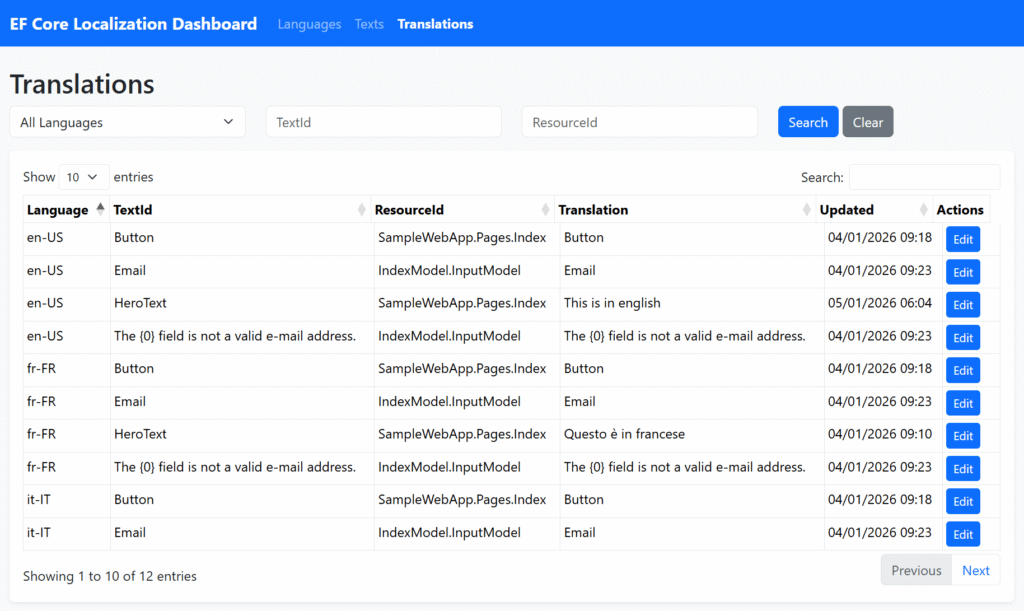
To ensure stakeholders don’t need direct database access, the fbognini.EfCoreLocalization.Dashboard package provides a ready-to-use management interface.
From the dashboard, users can filter by ResourceId, search for specific keys, and update translations on the fly. Since the data is cached in memory, after a massive update, you can invalidate the cache to make changes live globally (check the official documentation for details on cache reset implementation).
Securing the Dashboard
Access is protected via a custom AuthorizationFilter, allowing you to integrate your existing security policies:
var dashboardOptions = new DashboardOptions
{
    Authorization = new[] { new AdminRoleAuthorizationFilter() }
};

app.UseEfCoreLocalizationDashboard(pathMatch: "/localization", options: dashboardOptions);Key Takeaways
- Zero redeploys: Update text, labels, and error messages at runtime.
- Performance: In-memory caching ensures that database lookups don’t slow down your request pipeline.
- Multi-DB ready: Isolate translations in a separate database to share them across multiple microservices.
- Standard API: Continue using
IStringLocalizer<T>andIViewLocalizerwithout changing your coding style.
For the full source code and advanced usage examples, check out the official GitHub repository.
Leave a Reply